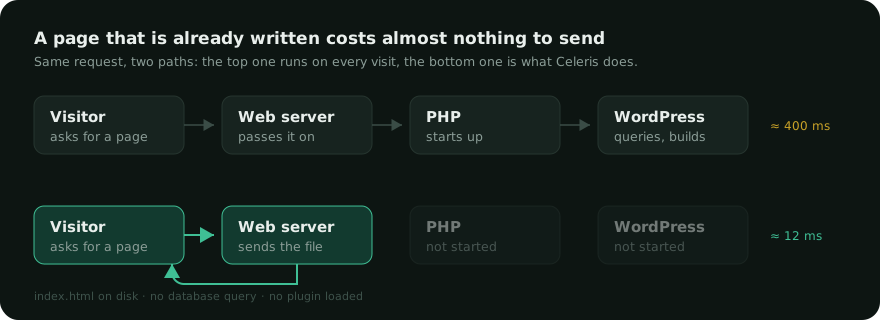
Open the network panel of your browser on a WordPress site and look at the very first line: the HTML document. Before a single image or font is fetched, before any script runs, the browser is already waiting. On an ordinary shared host, that wait is somewhere between 300 and 900 milliseconds — and it happens on every single visit, for every single visitor.
What the server is doing while nothing appears
A WordPress page does not exist until someone asks for it. When the request arrives, PHP starts, WordPress loads its core files, then every active plugin, then the theme. It queries the database — usually between twenty and two hundred times — assembles the result, and hands back a block of HTML.
That work is real, and it is often necessary. What is rarely necessary is doing it again, identically, for the next visitor who asks for the same page five seconds later.
The idea behind a page cache
A page cache writes the finished HTML to a file. The next visitor gets that file. Nothing is rebuilt, nothing is queried, and on a well-configured server PHP is not even started: the web server finds the file and sends it.

The difference is not a percentage, it is a change of category. Building a page is work measured in hundreds of milliseconds. Sending a file that already exists is work measured in single digits.
Why some caches are much faster than others
Every cache plugin stores HTML somewhere. What separates them is how early in the chain the file is found.
- Inside WordPress. The plugin hooks in late, so WordPress has already loaded before the cached page is returned. Faster than nothing, but most of the cost is already paid.
- Before WordPress, in PHP. A small file called a drop-in runs at the very start of the request and answers immediately. PHP starts, WordPress does not.
- Before PHP. A few rules in the server configuration let Apache or nginx return the file directly. Nothing of WordPress runs at all.
The last two are where the interesting numbers live. It is also where the awkward cases live — logged-in visitors, carts, forms with security tokens — which is why a cache that serves before PHP has to be careful about what it is allowed to serve.
A fast server answer is only half the story: the browser then has to draw the page, and that is where critical CSS comes in.
What a cache must never get wrong
Speed is easy. Correctness is the hard part, and it is what makes people distrust caching.
- Logged-in visitors must never receive a page built for someone else. A cookie check settles it.
- Carts and checkouts must be excluded outright: those pages are personal by definition.
- Security tokens embedded in forms expire. A page kept for a week can hand a visitor a token that WordPress will refuse — the classic “are you sure you want to do this?” error. A cache that keeps pages for a long time has to shorten the life of the ones that carry a token.
- Publishing must clear what it affects: the post, the home page, the archives it belongs to, the feeds.
How to check what your site actually does
Open a private window — being logged in changes everything — and load a page twice. In the network panel, look at the response headers of the document. A cache plugin usually announces itself there. Then compare the “waiting” time between the first and the second load.
If the second load is not markedly faster than the first, the cache is either off, or bypassed by something on the page. That is worth knowing before spending an afternoon optimising images. If you are unsure which number to trust, we wrote a separate piece on measuring speed honestly.
Celeris serves cached pages before PHP starts when the server allows it, and from a drop-in otherwise. Its status screen shows which of the two is actually answering your visitors.