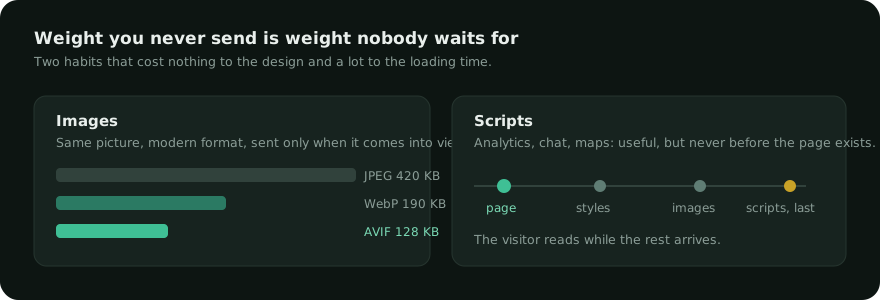
On most sites, images are between 60 and 80 percent of the weight of a page. They are also where the easiest gains are: nothing about the design changes, nobody notices anything except that the page arrives sooner.

Modern formats, same picture
JPEG dates from 1992. WebP and AVIF encode the same image with far fewer bytes: typically half for WebP, a third for AVIF, with no visible difference at normal quality settings.
Both are supported by every browser people actually use today. The safe way to serve them is to keep the original and offer the modern version to browsers that accept it — so nothing breaks for anyone.
Loading only what is on screen
A long page can hold thirty images. A visitor who reads the first paragraph and leaves has downloaded all thirty. Loading them as they come into view is a one-attribute change, and it is the single biggest saving on article pages.
One exception matters, and it is the same one LCP punishes: the image at the top of the page — the hero, the featured image — must not be deferred. It is usually the largest element of the first screen, and delaying it delays the moment the page looks ready. Defer everything below, never the first one.
Dimensions: the fix nobody thinks about
An image without width and height attributes has no reserved space. The browser lays out the text, then the image arrives and shoves everything down. That is the jump you feel when a page is loading — and it is measured, penalised, and entirely avoidable.
Adding the real dimensions to every image costs nothing and removes most layout shift on a typical site.
Before optimising, resize
The most common mistake is not the format: it is uploading a 4000-pixel photograph straight from a phone into a slot 800 pixels wide. No compression rescues an image five times larger than it needs to be.
Resize to roughly twice the display size — enough for high-density screens, no more — then convert. In that order, the gains multiply.
What to do this afternoon
- Open your home page, look at the largest image, and check its real dimensions against its display size.
- Turn on modern formats and on-demand loading, with the first image excluded.
- Make sure every image carries its dimensions.
- Re-measure. On an image-heavy page, halving the weight is normal.
- Then look at third-party scripts, which usually cost more than they look.
Celeris converts images to WebP and AVIF on your own server, keeps the originals, adds missing dimensions, and leaves the first image alone.