A WordPress site is rarely slow on its first day. It becomes slow the way a house becomes cluttered: one useful thing at a time, each perfectly justified, until opening a drawer takes ten seconds. Understanding what accumulates is more useful than any single optimisation.
What actually grows
Four things, and only one of them is your content.
- Plugins that load on every page. A contact form plugin loads its scripts on your articles. A slider plugin loads on pages with no slider. Each one is small; twenty of them are not.
- Post revisions. WordPress keeps every draft you saved. A page edited forty times is forty-one rows, each holding a full copy of the content.
- Options loaded on every request. WordPress reads a table of settings before doing anything else. Plugins write to it, and rarely clean up when uninstalled. On old sites this single query can read several megabytes.
- Transients that never expire. Cached fragments left behind by plugins, sometimes thousands of rows, sometimes with no expiry date at all.
The symptom that tells you which one
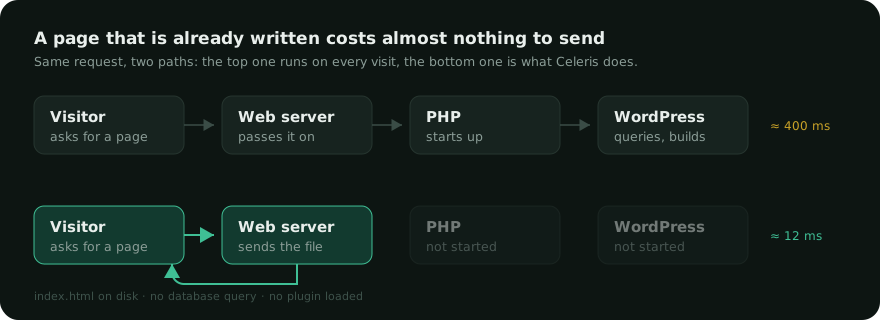
If the public site is slow but the admin feels fine, the weight is in what the front end loads: scripts, styles, images. A page cache hides most of it, and front-end optimisation fixes the rest.
If the admin is slow — the post list, the dashboard, saving a page — the weight is in the database. No cache helps there, because the admin is never cached. That is when cleaning up genuinely pays.
Cleaning up, in a sensible order
- Back up first. Everything below deletes rows. A database export takes a minute and buys you the right to be wrong.
- Expired transients. The safest thing you will ever delete: they are, by definition, out of date.
- Revisions beyond the last few. Keeping three per post is plenty. Keeping forty helps nobody.
- Spam and trashed comments. They sit in the same table as the real ones and slow down every count.
- Orphaned metadata — rows pointing to posts that no longer exist, usually left by a plugin removed years ago.
- Plugins you no longer use. Deactivating is not removing: the tables and options stay. Delete properly.
Do this once, then once a month. It takes seconds after the first pass, because there is far less to remove.
The one habit that matters most
Before installing a plugin, ask what it will load on pages that do not use it. A plugin that adds one feature to one page, but loads 200 KB everywhere, is a bad trade — however good the feature is.
Sites that stay fast are rarely the ones with the best optimisation plugin. They are the ones with fewer things running. Before and after any clean-up, measure the same page both ways: it is the only way to know whether it changed anything.
Celeris includes a database tab that removes expired transients, excess revisions, spam and orphaned metadata — and tells you how much each one weighs before you touch anything.